The Jairus-Scope (Rocket Flight Test and Data Logger)
This project is a rocket flight test system designed to spin a gyroscope with a DC motor and a microcontroller. The speed and direction of the motor are controlled with a Bluetooth module. When building the gyroscope, I had to integrate electronics, programming, and mechanical design while overcoming many different challenges in every process. I wanted to do this project because it combined my interests in aerospace, electronics, and hands-on engineering.
| Engineer | School | Area of Interest | Grade |
|---|---|---|---|
| Jairus B | American Canyon High | Mechanical Engineering | Incoming Senior |
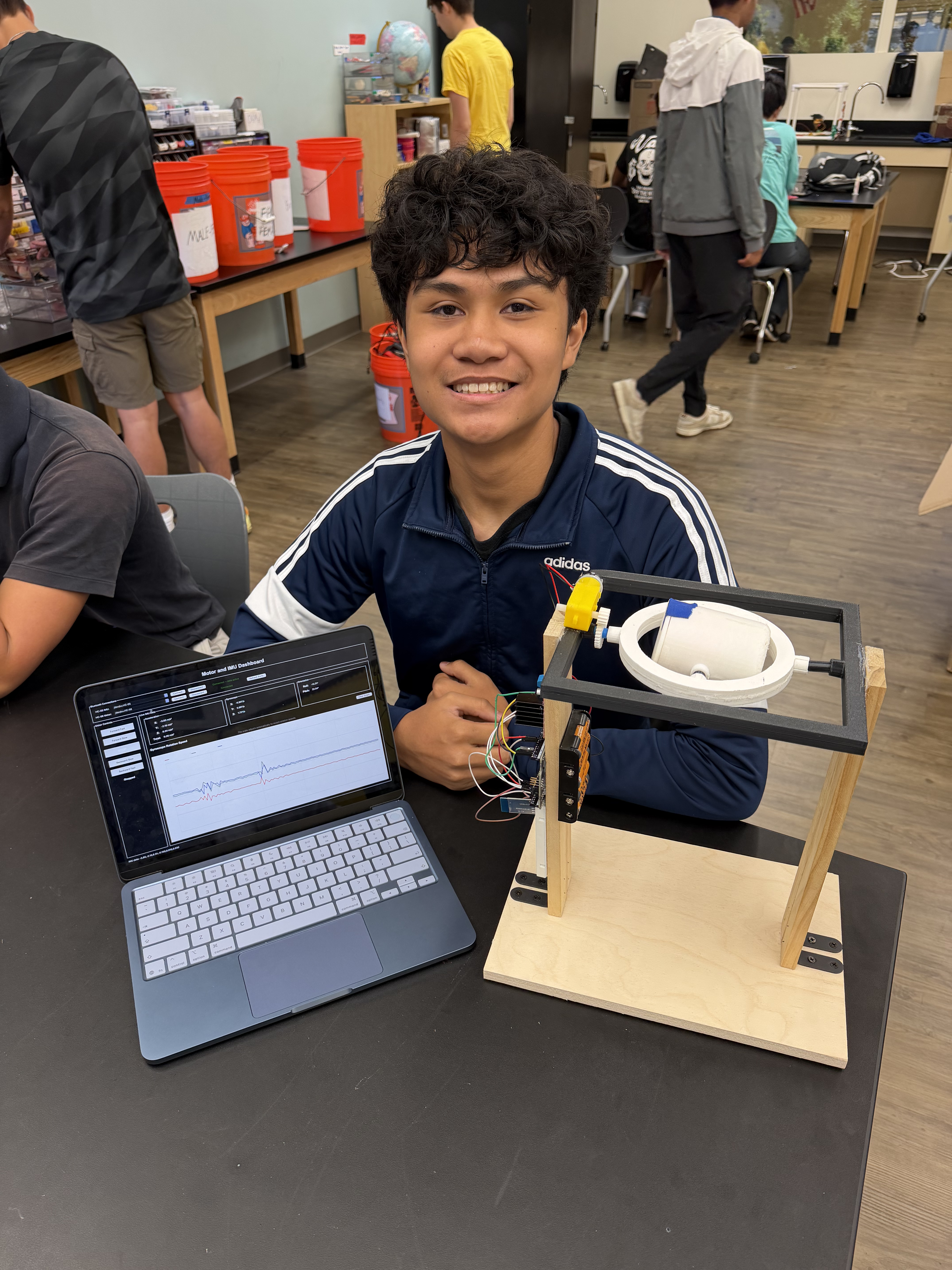
Modification Milestone
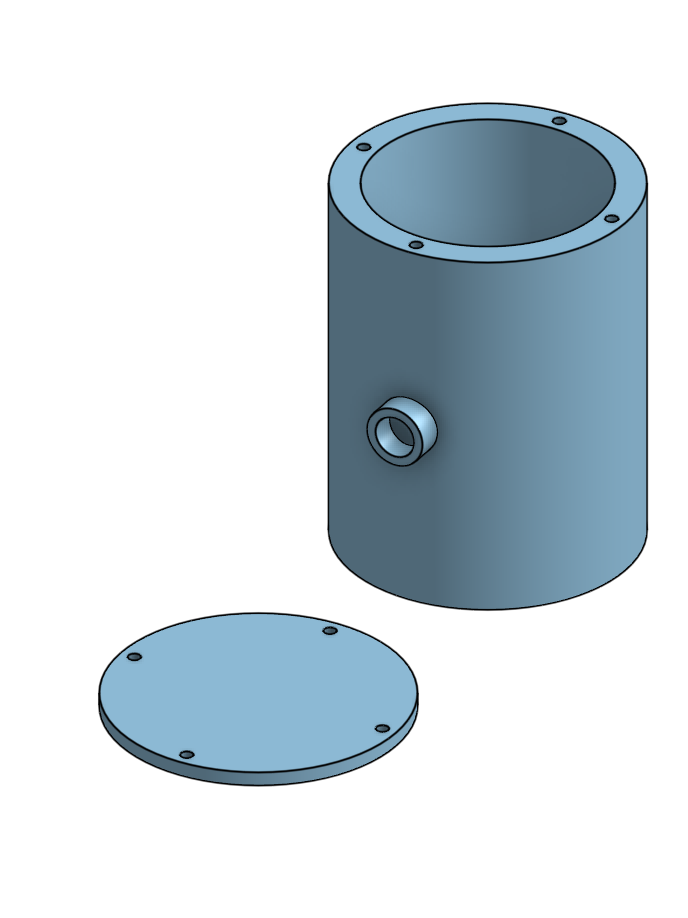
Description: In my modification milestone, I added the rocket capsule, which fits an Arduino Nano, 9V battery, HC-05 Bluetooth module, and an IMU sensor. I combined these components as compact as possible, and then measured it so that it could fit nicely inside a rocket capsule, which i designed with CAD. I also designed a cover with screw holes so that I can open and close it when needed.
This led to my 2nd modification, which is making an interface, where I can access the data from the IMU. This interface combines the Arduino UNO from my motor and Arduino Nano all into one place, where I can control the motor and see data at the same time. The IMU, which has an accelerometer and a gyroscope in it, is sending data to the interface, which is displayed on the graph. The graph shows how fast the IMU is rotating around different axes. There is also data above from the accelerometer, gyroscope, and also the pitch and roll of the IMU.
Challenges Overcame: The main challenge that I had with my first modification was making the components as compact as possible. This was needed because I didn’t have much space inside my outer ring to fit a rocket capsule. I solved this by utilizing both sides of a breadboard to keep all the components together.
The next challenge I faced was Bluetooth connection and creating the interface. Once I added the IMU part of my project, it was difficult to connect both Bluetooth modules to my laptop and control them at the same time. I solved this by making one interface that can connect to multiple ports. Once I was able to get the Bluetooth connection down, I created the buttons, data, and graph on the interface.
Next Steps: For this project in the future, I want to reprint the outer ring of the gyroscope. This is because my rocket holder can occasionally scrape against the outer ring, causing it to stabilize too quick due to friction. Another step I would want to take is to design a rocket holder that takes in account the weight imbalance inside of it or to add a counterweight. At the moment, the rocket holder tilts due to the heavy battery inside. This causes it to stabilize incorrectly. Fixing this issue would make my gyroscope more accurate and similar to a real gyroscope.
Final Milestone
Description: For my final milestone, I connected a Bluetooth module to my Arduino. This allowed me to control the motion of my motor and gyroscope with a wireless connection. After that, I created an interface in Visual Studio Code with Python. I utilized Tkinter to create a window with different buttons that correspond to the same inputs that have differing speeds in my Arduino IDE code.
Challenges and Triumphs of BSE: Coming into BlueStamp Engineering, I had little experience with electronics, programming, and designing with CAD. Although there were many other challenges that came along the way, the biggest challenge for me was learning to design with CAD. Most of my project had to be 3D printed, so I had to design each part in Onshape. Despite this issue, I was able to persevere and work through these problems. Once I learned the basics with a few tutorials, I was able to figure out how to CAD and build my project.
Key Topics: Throughout my time in BlueStamp Engineering, I learned how to program an Arduino and connect electronic components such as motors, sensors, batteries, and Bluetooth modules. I also learned CAD and 3D printing by designing and assembling custom parts for my project. Through testing and troubleshooting, I improved both the mechanical and electrical parts of my design. I also documented my work through code, videos, and a GitHub portfolio.
Future Aspirations: In the future, I hope to study mechanical or aerospace engineering and continue building projects that combine coding, electronics, and design. I want to improve my CAD, programming, and problem-solving skills through more hands-on experiences. I also hope to work on technology related to robotics, transportation, or aerospace. Ultimately, I want to use engineering to create practical solutions that make a meaningful impact.
Second Milestone
Description: In my second milestone, I powered the rotation of my gyroscope with a DC motor. I did this using two gears with a 2:1 gear ratio, a motor driver, an Arduino Uno, and a battery pack containing five AA batteries. The battery pack supplies power to the motor, while the motor driver uses signals from the Arduino to control the motor’s speed and direction. The DC motor spins a small gear, which transfers motion to a larger gear attached to the gyroscope’s rod. The Arduino serves as the brain of the system. After writing a program with different motor speeds, I uploaded it to the Arduino so it could send commands to the motor driver based on my input.
The most surprising part of this project was having to learn more about different gear ratios and actually testing them. At first, my initial gear ratio didn’t work and my DC motor would stall. After learning about the appropriate number of teeth and gear ratio for my situation, I was able to spin the gyroscope with little to no problems.
Challenges Overcame: The main challenge that I have overcome since the last milestone is getting more comfortable and faster with CAD. Creating new sketches became a lot easier as I got more familiar with Onshape. Also, I got more familiar with my components and was able to identify what was wrong a lot quicker.
Next Steps: For my final milestone, I need to connect a bluietooth module to my microcontroller, allowing wireless control. Afterwards, I want to create an interface which will make it cleaner to look at and easier to control my motor.
First Milestone
Description: For my Rocket Flight Test and Data Logger, I plan on attaching a gyroscope to a wooden base. Then I will spin the gyroscope with a motor via a gear connection. Currently, I have a gyroscope attached to vertical wooden supports on top of a wooden base. The gyroscope has 3 main parts: the outer frame, rotating gimbal, and rocket holder. The gimbal and rocket holder rotate around different axes of rotation. Each part is attached to each other with rods that can spin in their slot. To get to this point, I had to glue and screw in two wooden beams to a wooden base. Then, I measured the distance between the beams so that I could design and 3D print each of the main parts and the rods of the gyroscope. Afterwards, I glued each part together since I printed them in half for more precise prints. Once they were all printed, I connected everything with the rods and attached it to the wood.
Challenges: The first challenge I faced was screwing in the wooden supports onto the base. Since I didn’t have power tools, using a screwdriver took longer than expected and I had to make sure I was screwing in the right place.
The main challenge I had was designing each 3D printed part with CAD. I have never used CAD before, so using it took a long time. I used Onshape to create different parts and then put them all into one assembly. I had to learn how to create different shapes, planes, and mates to make sure my gyroscope would fit and rotate how I would want.
The next challenge I faced was testing different tolerances for my rods. I had to print many different rods with varying diameters so that I could get the right amount of tolerance between the hole and the rod.
Once I had passed all of these challenges, the only thing left to do was to piece everything together.
Next Steps: I plan on adding a motor to the side of my gyroscope so that I can spin the gyroscope. I will attach a gear to the motor and it will spin the gear that is attached to one of my rods. After that, I plan on adding connection to this motor so that I can control different speeds on a separate interface without a wired connection. After this, I will start thinking about different modifications.
Starter Project Milestone
Description: My starter project was the jitterbug. The project centered around a vibration motor, which allowed the robot to vibrate and move around. It also included two LEDs for lights, and a switch to toggle the power on and off. I spent most of my time soldering each component to the Jitterbug PCB, which improved my soldering skills.
Challenges: The main challenge for me was soldering all of the components onto the Jitterbug PCB. Since some pins were placed very close to each other, I had to take my time soldering. I focused on trying not to connect the solder between each hole, so that it wouldn’t short circuit. At the same time, I made sure to cover the entire hole, including the gold-plated border.
Next Step: With this soldering and robot building knowledge, I look forward to my main project. I hope to apply these skills to the best of my ability.
Schematics
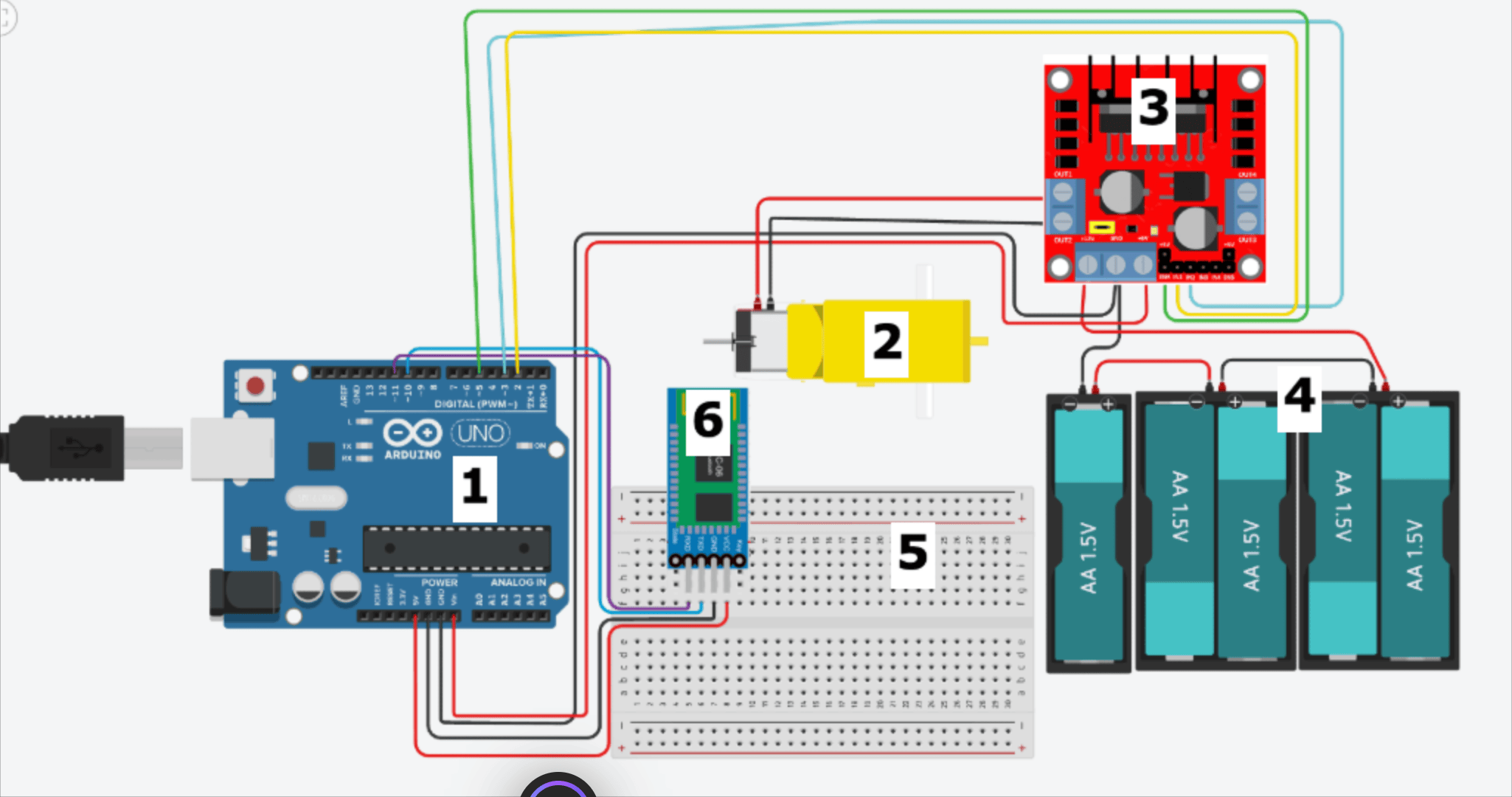
Motor Schematic:
This schematic includes:
- Arduino UNO R3
- DC Motor
- L298N Motor Driver
- 5 AA batteries
- Mini Breadboard
- HC-06 Bluetooth Module
Important Connections:
- Arduino UNO R3: GND -> Motor Driver GND (also has ground from batteries) and VIN -> +5V
- Motor Driver: ENA -> Digital 5, IN1 -> Digital 2, and IN2 -> Digital 3
- HC-06 Bluetooth Module: TXD -> Digital 10 and RXD -> Digital 11
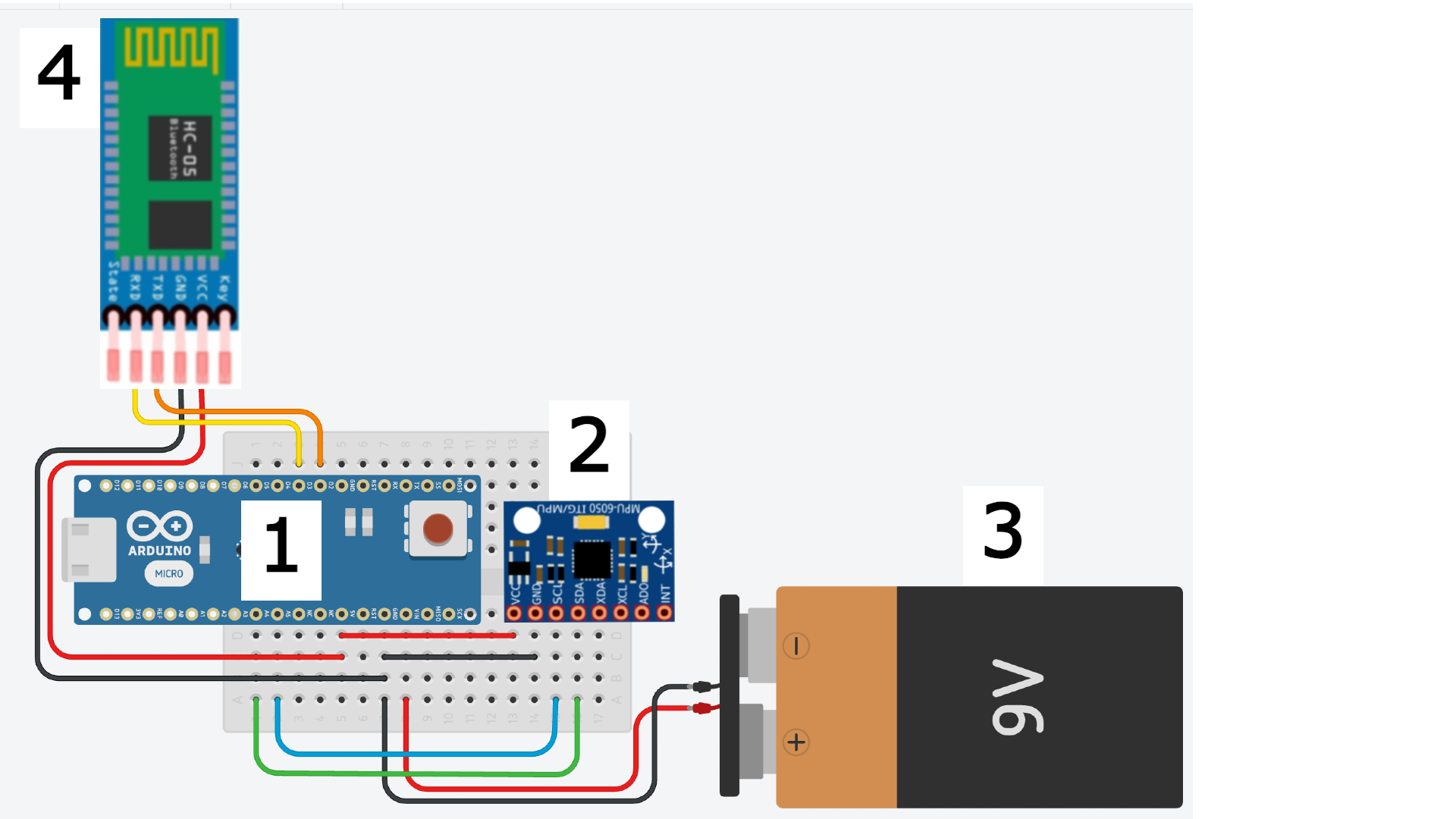
IMU Schematic:
For this schematic, I have:
- Arduino Nano
- MPU-6050 (IMU Sensor)
- 9V battery
- HC-05 Bluetooth Module
Important Connections:
- IMU Sensor: SCL -> A5 and SDA -> A4
- HC-05 Bluetooth Module: TXD -> D2 and RXD -> D3
CAD:
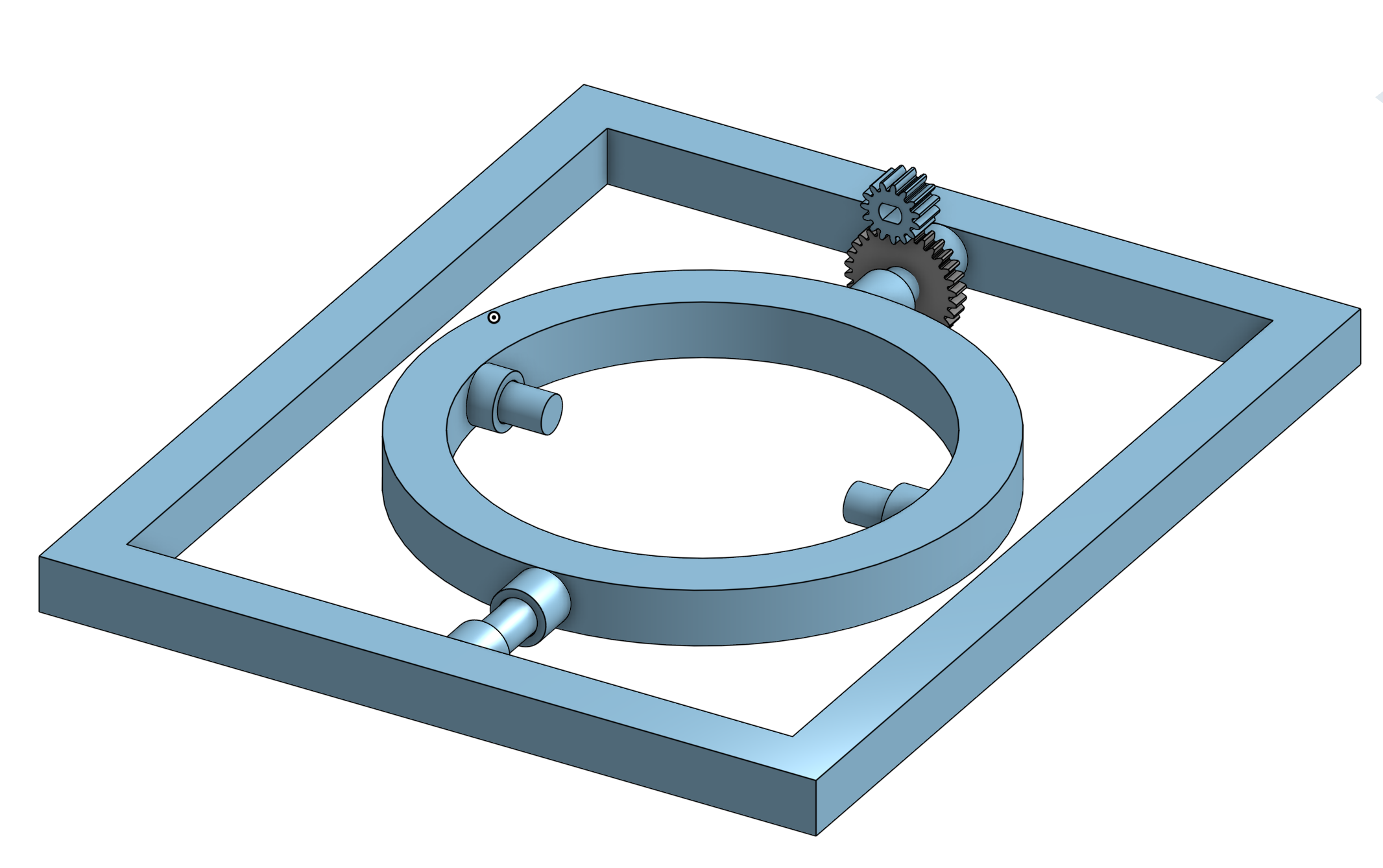
- This 1st CAD model shows a gyroscope assembly with a circular rotating ring mounted inside a rectangular support frame. A small gear system connects the motor to the ring, allowing the gyroscope to rotate while the surrounding pivots provide additional movement.
- The 2nd CAD model shows a cylindrical rocket holder with a removable circular cover. The holder includes mounting holes around the rim and an opening on top for inserting the IMU schematic components inside.
Arduino IDE Code (For the Motor)
#include <SoftwareSerial.h>

// HC-06 TX -> Digital Pin 10
// HC-06 RX -> Digital Pin 11
SoftwareSerial bluetooth(10, 11);

// Motor driver pins
const int EN = 5;
const int IN1 = 2;
const int IN2 = 3;

void setup() {

  // Start Serial Monitor
  Serial.begin(9600);

  // Start Bluetooth communication
  bluetooth.begin(9600);

  // Set motor pins as outputs
  pinMode(EN, OUTPUT);
  pinMode(IN1, OUTPUT);
  pinMode(IN2, OUTPUT);

}

void loop() {

  // Check if Bluetooth sent any data
  if (bluetooth.available() > 0) {

    // Read one character from Bluetooth
    char command = bluetooth.read();

    // Forward (Slow)
    if (command == 'F') {

      digitalWrite(IN1, HIGH);
      digitalWrite(IN2, LOW);

      analogWrite(EN, 165);

    }

    // Forward (Fast)
    if (command == 'G') {

      digitalWrite(IN1, HIGH);
      digitalWrite(IN2, LOW);

      analogWrite(EN, 210);

    }

    // Backward (Slow)
    if (command == 'B') {

      digitalWrite(IN1, LOW);
      digitalWrite(IN2, HIGH);

      analogWrite(EN, 165);

    }

    // Backward (Fast)
    if (command == 'H') {

      digitalWrite(IN1, LOW);
      digitalWrite(IN2, HIGH);

      analogWrite(EN, 210);

    }

    // Stop
    if (command == 'S') {

      digitalWrite(IN1, LOW);
      digitalWrite(IN2, LOW);

      analogWrite(EN, 0);

    }

  }

}
Arduino IDE Code (For the Sensor)
#include <Adafruit_MPU6050.h>
#include <Adafruit_Sensor.h>
#include <Wire.h>
#include <SoftwareSerial.h>

// HC-05 TX -> Arduino D2
// HC-05 RX -> Arduino D3
SoftwareSerial bluetooth(2, 3);

Adafruit_MPU6050 mpu;

const unsigned long UPDATE_INTERVAL_MS = 50;  // 20 updates per second
unsigned long previousUpdate = 0;

void setup() {
  Serial.begin(115200);
  bluetooth.begin(9600);

  Serial.println("Starting MPU6050...");

  if (!mpu.begin()) {
    Serial.println("Failed to find MPU6050");
    bluetooth.println("ERROR");

    while (true) {
      delay(10);
    }
  }

  mpu.setAccelerometerRange(MPU6050_RANGE_16_G);
  mpu.setGyroRange(MPU6050_RANGE_250_DEG);

  // Faster response than 21 Hz
  mpu.setFilterBandwidth(MPU6050_BAND_44_HZ);

  Serial.println("MPU6050 ready");
  bluetooth.println("READY");
}

void loop() {
  unsigned long currentTime = millis();

  if (currentTime - previousUpdate >= UPDATE_INTERVAL_MS) {
    previousUpdate = currentTime;

    sensors_event_t acceleration;
    sensors_event_t gyro;
    sensors_event_t temperature;

    mpu.getEvent(&acceleration, &gyro, &temperature);

    // Compact CSV:
    // AccelX,AccelY,AccelZ,GyroX,GyroY,GyroZ

    bluetooth.print(acceleration.acceleration.x, 2);
    bluetooth.print(",");

    bluetooth.print(acceleration.acceleration.y, 2);
    bluetooth.print(",");

    bluetooth.print(acceleration.acceleration.z, 2);
    bluetooth.print(",");

    bluetooth.print(gyro.gyro.x, 3);
    bluetooth.print(",");

    bluetooth.print(gyro.gyro.y, 3);
    bluetooth.print(",");

    bluetooth.println(gyro.gyro.z, 3);

    // Optional Serial Monitor output
    Serial.print(acceleration.acceleration.x, 2);
    Serial.print(",");

    Serial.print(acceleration.acceleration.y, 2);
    Serial.print(",");

    Serial.print(acceleration.acceleration.z, 2);
    Serial.print(",");

    Serial.print(gyro.gyro.x, 3);
    Serial.print(",");

    Serial.print(gyro.gyro.y, 3);
    Serial.print(",");

    Serial.println(gyro.gyro.z, 3);
  }
}
Python Code (For the Interface)
import tkinter as tk
from tkinter import ttk, messagebox
import serial
import serial.tools.list_ports
import threading
import queue
import math
import re
import time
from collections import deque
# Main settings
BAUD = 9600
HISTORY = 120
TIMEOUT = 1.5
class Dashboard:
def __init__(self, root):
self.root = root
self.root.title("Gyroscope Dashboard")
self.root.geometry("1000x720")
self.root.minsize(900, 650)
# Bluetooth connections
self.imu = None
self.motor = None
self.running = True
# IMU data storage
self.imu_queue = queue.Queue()
self.last_imu_data = 0
self.gx = deque(maxlen=HISTORY)
self.gy = deque(maxlen=HISTORY)
self.gz = deque(maxlen=HISTORY)
self.latest = [0, 0, 0]
self.build_ui()
self.refresh_ports()
# Repeating updates
self.root.after(20, self.update_imu)
self.root.after(100, self.draw_graph)
self.root.after(500, self.check_imu)
self.root.protocol("WM_DELETE_WINDOW", self.close)
# Main interface
def build_ui(self):
tk.Label(
self.root,
text="Motor and IMU Dashboard",
font=("Arial", 22, "bold")
).pack(pady=10)
connections = tk.LabelFrame(
self.root,
text="Bluetooth Connections",
padx=10,
pady=10
)
connections.pack(fill="x", padx=15)
self.imu_port = self.connection_row(
connections,
0,
"HC-05 IMU:",
self.connect_imu,
self.disconnect_imu
)
self.imu_status = self.status_label(connections, 0)
self.motor_port = self.connection_row(
connections,
1,
"HC-06 Motor:",
self.connect_motor,
self.disconnect_motor
)
self.motor_status = self.status_label(connections, 1)
tk.Button(
connections,
text="Refresh Ports",
command=self.refresh_ports
).grid(row=0, column=5, rowspan=2, padx=10)
main = tk.Frame(self.root)
main.pack(fill="both", expand=True, padx=15, pady=10)
self.build_motor_ui(main)
self.build_imu_ui(main)
self.raw_label = tk.Label(
self.root,
text="Waiting for IMU data...",
anchor="w"
)
self.raw_label.pack(fill="x", padx=15, pady=(0, 8))
def connection_row(self, parent, row, text, connect, disconnect):
tk.Label(
parent,
text=text
).grid(row=row, column=0, padx=5, pady=5)
box = ttk.Combobox(
parent,
width=30,
state="readonly"
)
box.grid(row=row, column=1, padx=5)
tk.Button(
parent,
text="Connect",
command=connect
).grid(row=row, column=2, padx=5)
tk.Button(
parent,
text="Disconnect",
command=disconnect
).grid(row=row, column=3, padx=5)
return box
def status_label(self, parent, row):
label = tk.Label(
parent,
text="Disconnected",
fg="red",
width=22
)
label.grid(row=row, column=4, padx=5)
return label
# Motor controls
def build_motor_ui(self, parent):
frame = tk.LabelFrame(
parent,
text="Motor Controls",
padx=15,
pady=15
)
frame.pack(side="left", fill="y", padx=(0, 10))
for text, command in [
("Forward Fast", "G"),
("Forward Slow", "F")
]:
self.motor_button(frame, text, command)
tk.Button(
frame,
text="STOP",
command=lambda: self.send_motor("S"),
width=16,
height=2,
bg="red",
fg="white",
font=("Arial", 13, "bold")
).pack(pady=12)
for text, command in [
("Backward Slow", "B"),
("Backward Fast", "H")
]:
self.motor_button(frame, text, command)
self.motor_message = tk.StringVar(
value="Motor stopped"
)
tk.Label(
frame,
textvariable=self.motor_message,
font=("Arial", 11, "bold")
).pack(pady=15)
def motor_button(self, parent, text, command):
tk.Button(
parent,
text=text,
command=lambda: self.send_motor(command),
width=16,
height=2
).pack(pady=5)
# IMU display
def build_imu_ui(self, parent):
frame = tk.LabelFrame(
parent,
text="Live IMU Data",
padx=12,
pady=10
)
frame.pack(side="left", fill="both", expand=True)
readings = tk.Frame(frame)
readings.pack(fill="x")
names = [
"Accel X",
"Accel Y",
"Accel Z",
"Accel Total",
"Gyro X",
"Gyro Y",
"Gyro Z",
"Roll",
"Pitch"
]
self.values = {
name: tk.StringVar(value="0.00")
for name in names
}
self.value_box(
readings,
0,
"Acceleration",
[
("X:", "Accel X"),
("Y:", "Accel Y"),
("Z:", "Accel Z"),
("Total:", "Accel Total")
]
)
self.value_box(
readings,
1,
"Gyroscope",
[
("X:", "Gyro X"),
("Y:", "Gyro Y"),
("Z:", "Gyro Z")
]
)
self.value_box(
readings,
2,
"Orientation",
[
("Roll:", "Roll"),
("Pitch:", "Pitch")
]
)
for column in range(3):
readings.columnconfigure(column, weight=1)
header = tk.Frame(frame)
header.pack(fill="x", pady=(15, 3))
tk.Label(
header,
text="Gyroscope Rotation Speed",
font=("Arial", 12, "bold")
).pack(side="left")
tk.Button(
header,
text="Clear Graph",
command=self.clear_graph
).pack(side="right")
tk.Label(
frame,
text="The scale adjusts automatically to recent rotation speeds.",
fg="gray"
).pack()
self.graph = tk.Canvas(
frame,
height=350,
bg="white",
highlightthickness=1,
highlightbackground="gray"
)
self.graph.pack(fill="both", expand=True, pady=5)
def value_box(self, parent, column, title, rows):
box = tk.LabelFrame(
parent,
text=title,
padx=15,
pady=10
)
box.grid(
row=0,
column=column,
padx=8,
sticky="nsew"
)
for row, (label, key) in enumerate(rows):
tk.Label(
box,
text=label,
font=("Arial", 11, "bold")
).grid(
row=row,
column=0,
sticky="e",
padx=5,
pady=4
)
tk.Label(
box,
textvariable=self.values[key],
width=15,
anchor="w"
).grid(
row=row,
column=1,
sticky="w",
padx=5,
pady=4
)
# Bluetooth ports
def refresh_ports(self):
ports = [
port.device
for port in serial.tools.list_ports.comports()
]
self.imu_port["values"] = ports
self.motor_port["values"] = ports
for port in ports:
name = port.upper()
if "HC-05" in name or "HC05" in name:
self.imu_port.set(port)
if "HC-06" in name or "HC06" in name:
self.motor_port.set(port)
# HC-05 connection
def connect_imu(self):
port = self.imu_port.get()
if not port:
messagebox.showerror(
"HC-05",
"Select the HC-05 port."
)
return
if (
self.motor
and self.motor.is_open
and port == self.motor.port
):
messagebox.showerror(
"Incorrect Port",
"HC-05 and HC-06 cannot use the same port."
)
return
self.disconnect_imu()
try:
connection = serial.Serial(
port,
BAUD,
timeout=0.1
)
connection.reset_input_buffer()
self.imu = connection
self.last_imu_data = 0
self.imu_status.config(
text="Waiting for data",
fg="orange"
)
threading.Thread(
target=self.read_imu,
args=(connection,),
daemon=True
).start()
except serial.SerialException as error:
messagebox.showerror(
"HC-05 Error",
str(error)
)
def read_imu(self, connection):
while (
self.running
and self.imu is connection
and connection.is_open
):
try:
line = connection.readline().decode(
errors="ignore"
).strip()
if line:
self.imu_queue.put(line)
except serial.SerialException:
break
def disconnect_imu(self):
connection = self.imu
self.imu = None
if connection:
try:
connection.close()
except serial.SerialException:
pass
if hasattr(self, "imu_status"):
self.imu_status.config(
text="Disconnected",
fg="red"
)
# IMU updates
def update_imu(self):
try:
while True:
line = self.imu_queue.get_nowait()
data = self.parse_imu(line)
if data and self.imu:
self.show_imu(data)
self.last_imu_data = time.monotonic()
self.imu_status.config(
text="Connected — data active",
fg="green"
)
self.raw_label.config(
text=f"IMU data: {line}"
)
else:
self.raw_label.config(
text=f"Unrecognized data: {line}"
)
except queue.Empty:
pass
if self.running:
self.root.after(20, self.update_imu)
def check_imu(self):
if self.imu and self.imu.is_open:
if self.last_imu_data == 0:
self.imu_status.config(
text="Waiting for data",
fg="orange"
)
elif time.monotonic() - self.last_imu_data > TIMEOUT:
self.imu_status.config(
text="Connected — data stopped",
fg="orange"
)
if self.running:
self.root.after(500, self.check_imu)
def parse_imu(self, line):
parts = [
part.strip()
for part in line.split(",")
]
if len(parts) == 6:
try:
return list(map(float, parts))
except ValueError:
pass
number = (
r"[-+]?(?:\d+(?:\.\d*)?|\.\d+)"
r"(?:[eE][-+]?\d+)?"
)
matches = re.findall(
rf"(AccelX|AccelY|AccelZ|GyroX|GyroY|GyroZ)"
rf"\s*:\s*({number})",
line
)
values = {
name: float(value)
for name, value in matches
}
names = [
"AccelX",
"AccelY",
"AccelZ",
"GyroX",
"GyroY",
"GyroZ"
]
if all(name in values for name in names):
return [
values[name]
for name in names
]
return None
def show_imu(self, data):
ax, ay, az, gx, gy, gz = data
gx, gy, gz = map(
math.degrees,
(gx, gy, gz)
)
total = math.sqrt(
ax ** 2 + ay ** 2 + az ** 2
)
roll = math.degrees(
math.atan2(ay, az)
)
pitch = math.degrees(
math.atan2(
-ax,
math.sqrt(ay ** 2 + az ** 2)
)
)
updates = {
"Accel X": f"{ax:.2f} m/s²",
"Accel Y": f"{ay:.2f} m/s²",
"Accel Z": f"{az:.2f} m/s²",
"Accel Total": f"{total:.2f} m/s²",
"Gyro X": f"{gx:.2f}°/s",
"Gyro Y": f"{gy:.2f}°/s",
"Gyro Z": f"{gz:.2f}°/s",
"Roll": f"{roll:.2f}°",
"Pitch": f"{pitch:.2f}°"
}
for name, value in updates.items():
self.values[name].set(value)
self.latest = [gx, gy, gz]
self.gx.append(gx)
self.gy.append(gy)
self.gz.append(gz)
# HC-06 connection
def connect_motor(self):
port = self.motor_port.get()
if not port:
messagebox.showerror(
"HC-06",
"Select the HC-06 port."
)
return
if (
self.imu
and self.imu.is_open
and port == self.imu.port
):
messagebox.showerror(
"Incorrect Port",
"HC-05 and HC-06 cannot use the same port."
)
return
self.disconnect_motor()
try:
self.motor = serial.Serial(
port,
BAUD,
timeout=0.1
)
self.motor_status.config(
text="Connected",
fg="green"
)
except serial.SerialException as error:
messagebox.showerror(
"HC-06 Error",
str(error)
)
def disconnect_motor(self):
connection = self.motor
self.motor = None
if connection:
try:
connection.write(b"S")
connection.close()
except serial.SerialException:
pass
if hasattr(self, "motor_status"):
self.motor_status.config(
text="Disconnected",
fg="red"
)
def send_motor(self, command):
if not self.motor or not self.motor.is_open:
messagebox.showwarning(
"Motor",
"Connect the HC-06 first."
)
return
try:
self.motor.write(command.encode())
names = {
"F": "Forward slow",
"G": "Forward fast",
"B": "Backward slow",
"H": "Backward fast",
"S": "Stopped"
}
self.motor_message.set(
names.get(command, command)
)
except serial.SerialException:
self.disconnect_motor()
# Graph controls
def clear_graph(self):
self.gx.clear()
self.gy.clear()
self.gz.clear()
def draw_graph(self):
self.graph.delete("all")
width = max(
self.graph.winfo_width(),
500
)
height = max(
self.graph.winfo_height(),
300
)
left, right, top, bottom = 65, 20, 60, 45
graph_width = width - left - right
graph_height = height - top - bottom
values = (
list(self.gx)
+ list(self.gy)
+ list(self.gz)
)
largest = max(
(abs(value) for value in values),
default=0
)
scale = max(
25,
math.ceil(largest * 1.15 / 25) * 25
)
self.graph.create_text(
width / 2,
15,
text="Gyroscope Rotation Speed",
font=("Arial", 11, "bold")
)
colors = ["red", "green", "blue"]
names = ["X", "Y", "Z"]
for index, (name, color, value) in enumerate(
zip(names, colors, self.latest)
):
x = left + index * 150
self.graph.create_line(
x,
38,
x + 25,
38,
fill=color,
width=3
)
self.graph.create_text(
x + 32,
38,
text=f"{name}: {value:.1f}°/s",
anchor="w"
)
for value in [
scale,
scale / 2,
0,
-scale / 2,
-scale
]:
y = (
top
+ (scale - value)
/ (2 * scale)
* graph_height
)
self.graph.create_line(
left,
y,
width - right,
y,
fill="#dddddd"
)
self.graph.create_text(
left - 8,
y,
text=f"{value:.0f}",
anchor="e"
)
for index in range(6):
x = left + index / 5 * graph_width
self.graph.create_line(
x,
top,
x,
height - bottom,
fill="#eeeeee"
)
self.graph.create_text(
18,
top + graph_height / 2,
text="Rotation speed (°/s)",
angle=90
)
self.graph.create_text(
left,
height - 22,
text="Older",
anchor="w"
)
self.graph.create_text(
width - right,
height - 22,
text="Newest",
anchor="e"
)
self.graph.create_text(
width / 2,
height - 12,
text=f"Most recent {HISTORY} readings"
)
for history, color in zip(
[self.gx, self.gy, self.gz],
colors
):
self.draw_line(
history,
color,
left,
top,
graph_width,
graph_height,
scale
)
if self.running:
self.root.after(100, self.draw_graph)
def draw_line(
self,
history,
color,
left,
top,
width,
height,
scale
):
values = list(history)
if len(values) < 2:
return
points = []
for index, value in enumerate(values):
x = (
left
+ index
/ (len(values) - 1)
* width
)
y = (
top
+ (scale - value)
/ (2 * scale)
* height
)
points.extend([x, y])
self.graph.create_line(
points,
fill=color,
width=2
)
# Close safely
def close(self):
self.running = False
self.disconnect_motor()
self.disconnect_imu()
self.root.destroy()
root = tk.Tk()
Dashboard(root)
root.mainloop()
Bill of Materials
| Part | Note | Price | Link |
|---|---|---|---|
| Arduino Uno R3 | Program Execution | $16.99 | Link |
| Arduino Nano | Program Execution | $15.99 | Link |
| Motor Driver | Motor Control | $6.98 | Link |
| DC Gear Motor | Rotational motion | $6.99 | Link |
| MPU-6050 | IMU Sensor | $6.99 | Link |
| 5x AA Batteries | Power Supply | $6.49 | Link |
| 9V Battery | Power Supply | $6.49 | Link |
| HC-06 Bluetooth Module | Bluetooth Connection | $9.99 | Link |
| HC-05 Bluetooth Module | Bluetooth Connection | $9.99 | Link |
| Breadboard | Circuit Assembly | $6.99 | Link |
| L-Brackets & Screws | Holds Wooden Beams Upright | $6.99 | Link |
| Plywood | Stability | $18.48 | Link |
| Square Wooden Dowels | Vertical Supports | $13.99 | Link |
| PLA Filament | 3D Print Material | $13.99 | Link |
Additional Resources
These resources allowed me to learn and build this gyroscope.